Heating — heating.html
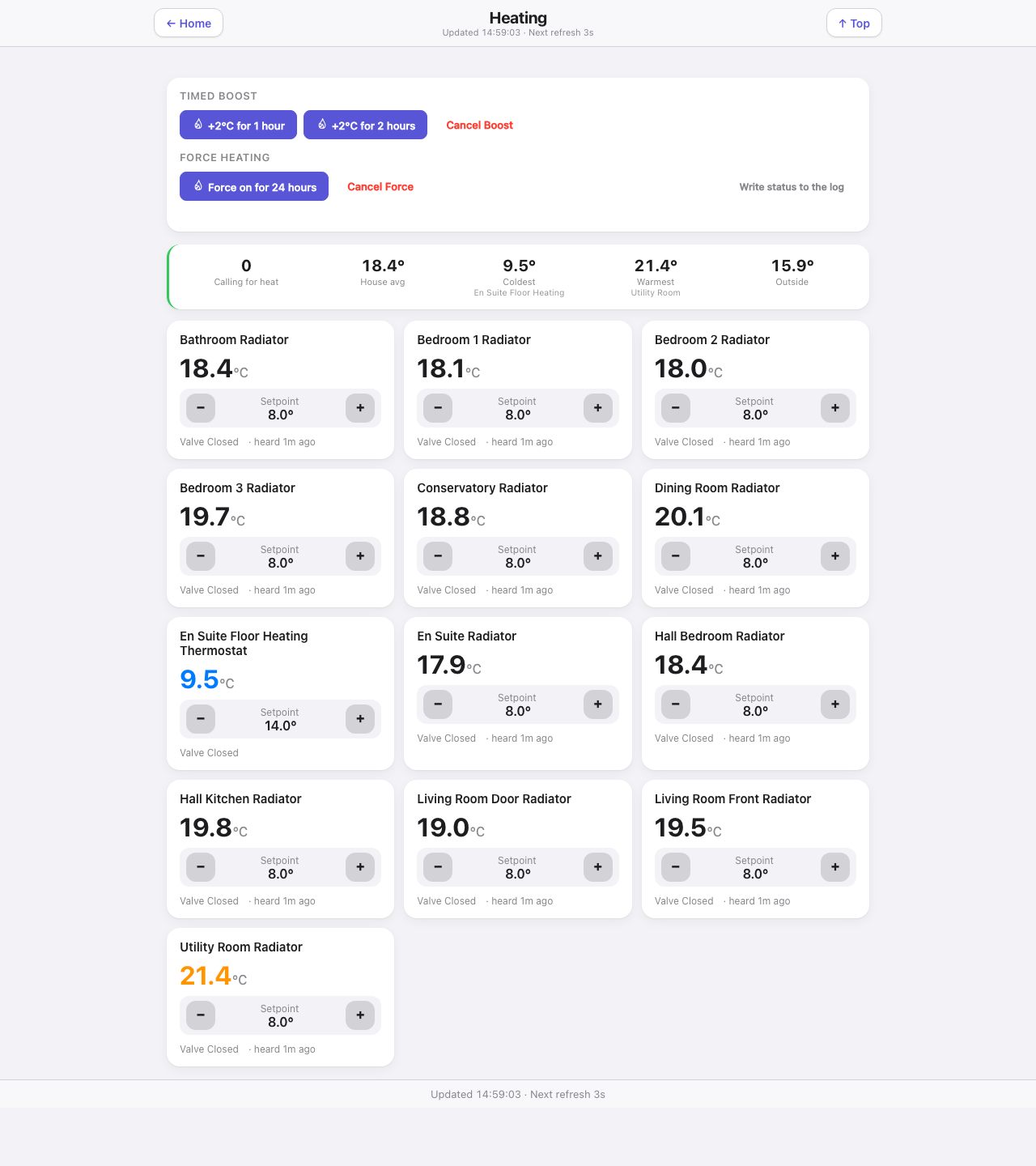
Every radiator zone with its live temperature and a working setpoint control, plus the two timed controls where the heating plugin supports them.
Down the page
Controls card. Drawn only when the EvoHomeControl plugin is installed and enabled — the buttons are wired to that plugin’s own actions. Two rows: Timed boost (22 °C for one hour, 22 °C for two hours, Cancel boost) and Summer shut-off override (bypass summer shut-off for 24 hours, Cancel override, and a link that writes the current heating state into the Indigo event log). Each of them asks for the control PIN, once per session, when any heating zone on the page is on the PIN list (Settings → Security), as the zones’ own buttons do, before 3.46.0 they skipped it.
Active buttons turn red and show the time left, counting down every second. Both a boost and the summer bypass can be active together. These are the controller’s saved timers, so they survive a page reload. If their status cannot be read, the page says so. A red button means the timer is active, not that a radiator must be heating.
Summary strip. Zones calling for heat, the house average, the coldest zone with its name, the warmest with its name, and the outside temperature. A coloured edge on the strip reflects whether anything is calling.
Zone grid. One card per zone: the name, the current temperature large, a setpoint stepper with minus and plus, the heat-demand status, and how long ago the zone was last heard from. A zone at an unusual temperature is coloured — blue when cold, amber when warm — so the grid reads at a glance.
Footer. Last update and the refresh cadence.
Where the numbers come from
| Part | Source |
|---|---|
| Zone temperatures, setpoints, heat demand, last heard | Indigo thermostat devices via /v2/api, through the shared delta cache |
| Room membership and titles | rooms.json |
| Timer status | evoHomeStatus, reading only the timer fields from EvoHomeControl’s saved state |
| Boost and summer bypass buttons | evoHomeAction, which passes the call through to the EvoHomeControl plugin |
Zone temperatures and setpoints work with any Indigo thermostat device. Only the boost and force buttons are plugin-specific.
Refresh
Zone readings and timer status refresh every three seconds. The countdown ticks every second.
What you can do here
- Step any zone’s setpoint up or down. Steps are whole degrees, because Indigo’s REST setpoint call is integer-only.
- Boost the rooms configured in EvoHomeControl for one or two hours. With EvoHomeControl 1.23.0 or later, Cancel Boost sets all radiators to 12 degrees until each room’s next scheduled temperature change; open-window protection still wins. Natural expiry returns to the schedule.
- Bypass summer shut-off for 24 hours, allowing normal scheduled heating, and cancel it.
- Write the current heating status to the Indigo log.
Worth knowing
- A setpoint change is read back repeatedly after being sent. A stopped heating plugin swallows the command without an error, so the tile would otherwise show the new number as if it had landed when nothing moved.
- “Last heard” is the honest clock for a battery radiator valve. One that has not spoken for hours is a valve to go and look at, whatever its temperature reads.
A room’s heating history
Tap anywhere on a room tile apart from its temperature buttons to open its history. It starts with the last 24 hours. The room selector and arrows move between zones; each radiator keeps its own graph, including rooms with two radiators. The Heating link returns to the overview.
- Blue is the room temperature. The dashed amber line is its target.
- The strip underneath is orange while the thermostat reports calling for heat, grey when it reports no demand, and striped when the readings are unknown. It does not measure radiator heat or prove the boiler is firing.
- Select Outside temperature to add the weather sensor’s recorded temperature, when available.
- Choose 6 hours, 24 hours or 7 days. The history refreshes once a minute.
- Purple dots and What changed show EvoHomeControl’s recorded requests and reasons, when its decision logs are available. Thermostat-reported target changes are listed separately. A requested target is not confirmation that it reached the thermostat.
The graph needs SQL Logger history. The reader keeps individual target changes and short heating calls rather than averaging them. Readings more than three hours old are treated as unknown, using the temperature-report heartbeat where it is recorded. Missing history is shown honestly; an unusually busy history or decision log reports when a read limit is reached. Repeated autumn-hour decision times cannot be placed reliably and are omitted with a note. The graph’s elapsed time remains correct across the clock changes.
Temperature changes and confirmation
The buttons show the requested temperature straight away, with Waiting for confirmation below them. The dashboard checks every five seconds for up to five minutes, allowing the radio controller time to report back. A confirmed temperature replaces the waiting message. If it cannot confirm, it says what the controller still reports, without hiding the room or its buttons. A schedule or window rule can still change the target; an unconfirmed request alone does not prove a radio fault. PIN protection and read-only guest access still apply.