Timeline — timeline.html
Everything the house has recorded, on one page. Four views, picked with the tabs under the title: Day replays a day, Nights shows the presence sensors night by night, Chart draws any recorded state, and Diary lists the notable events. Needs the SQL Logger. Until 3.33.0 the last three were separate pages (Presence, Graphs and Activity). Their old addresses still work and open the right view.
timeline.html                                  Day
timeline.html?view=nights                      Nights
timeline.html?view=chart&device=123&state=x    Chart, with a device already chosen
timeline.html?view=diary                       Diary
Day
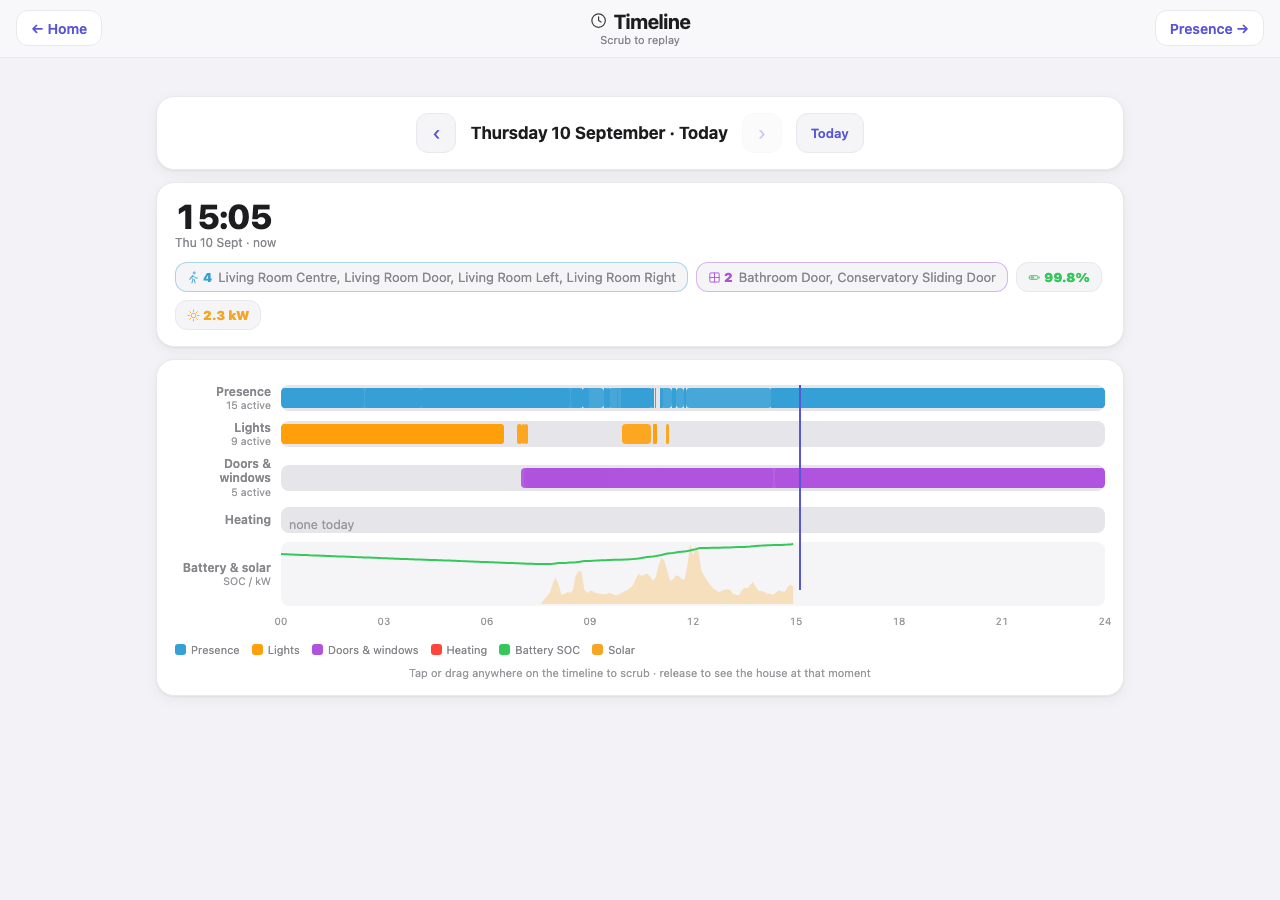
Drag along a day and the house tells you what it was doing at that moment.
Day picker. Previous and next arrows around the date, with a “Today” button.
Moment card. The time being examined, large, with the date and whether it is “now”. Under it, pills for that instant: how many presence sensors, lights and doors were active and which, the battery state of charge and the solar output. Tap a device name to open it in the Chart view.
Lanes. One row per category — Presence, Lights, Doors & windows, Heating, and Battery & solar — each spanning midnight to midnight. The first four are activity bars with a count of how many devices were active. Battery and solar is a chart: state of charge as a line, solar as a filled area. A vertical marker shows where you are scrubbing, and an empty lane says so in words. The Battery & solar lane, and the battery and solar pills on the moment card, come from the Sigenergy inverter, so without SigenEnergyManager they are left out and the other four lanes carry on.
Data: timelineDay with {"date": "YYYY-MM-DD"}. The plugin builds the day server-side from the SQL Logger history, by primary-key range rather than by timestamp: the history database has no index on its timestamp column, and a timestamp filter would scan the whole table and stall the logger’s own writes. The day loads once. Changing the date fetches again.
Nights
Rooms with more than one presence sensor, drawn as timelines so you can see not only whether the room was occupied but whether the sensors agreed about it. It exists because a radar sensor that quietly loses a motionless body reads exactly like an empty room. Needs the Presence_Watch.py companion script. The tab is hidden when that script is not installed.
Night picker and the key: all detected, one dropped, clear, movement. Then one card per room: a bar per sensor, a combined bar (green when all agree, amber where one dropped while another held), a movement strip, four tiles (first seen, last clear, occupied, disagreed), a line per sensor with its occupied time, changes and longest run. Sleep tiles where the script provides them (settled, up, in bed, wakeups). A banner per dropout naming which sensor dropped and which held, and the last seven nights as compact bars so a bad night stands out.
Data: presenceData, which serves what Presence_Watch.py writes — a fortnight of occupancy. It is deliberately not a public file: a record of when the house is empty is not something to publish. Refreshes every two minutes while the view is open.
- Many radar sensors keep their settings in their own firmware and revert them on a battery change. A night that holds at first and then fragments is adaptive sensitivity switching itself back on,
FP300_Config_Watch.pypolices exactly this for Aqara FP300s. - A sleeping adult’s only radar signature is chest movement, so a short absence timer is far too short for a bedroom. Two minutes is a good starting point.
Chart
Pick a device, one of its recorded states and a window (6 h, 24 h, 7 days, 30 days), and get a chart: the bucketed average as a line with a lighter band for the lowest and highest in each bucket, so a spike stays a spike. An on/off state is drawn as a step, with the share of time it was on. The strip underneath gives the latest, lowest and highest values.
Data: historyQuery. The plugin buckets server-side and turns the window into a row-id range before reading anything, so even a 30-day chart of a busy device stays bounded. The state list comes from the history table’s real columns: a state that has never been logged does not appear, which is the correct answer rather than a gap. Rows are written only on change, so the server fills forward before bucketing. Timestamps are stored in UTC and drawn in local time.
Diary
The notable lines from the Indigo event log: locks and door codes, doors, leaks and safety events, plugin restarts. When there is nothing, it says so, and its empty line is the whole editorial policy: “A script talking to itself does not.” Refreshes every 30 seconds while open.
Data: activityFeed. The automation list that used to sit beside the diary is now on the System health page, and errors are on Alerts.
Worth knowing
- History timestamps are UTC on SQLite while
device.lastChangedis local, so the server converts. A cross-check against another page that looks an hour out in summer is the timezone, not a delay. - The day boundary is local midnight, not UTC midnight.
- An empty Heating lane in August is the correct answer, not a gap in the data.