System health — system-health.html
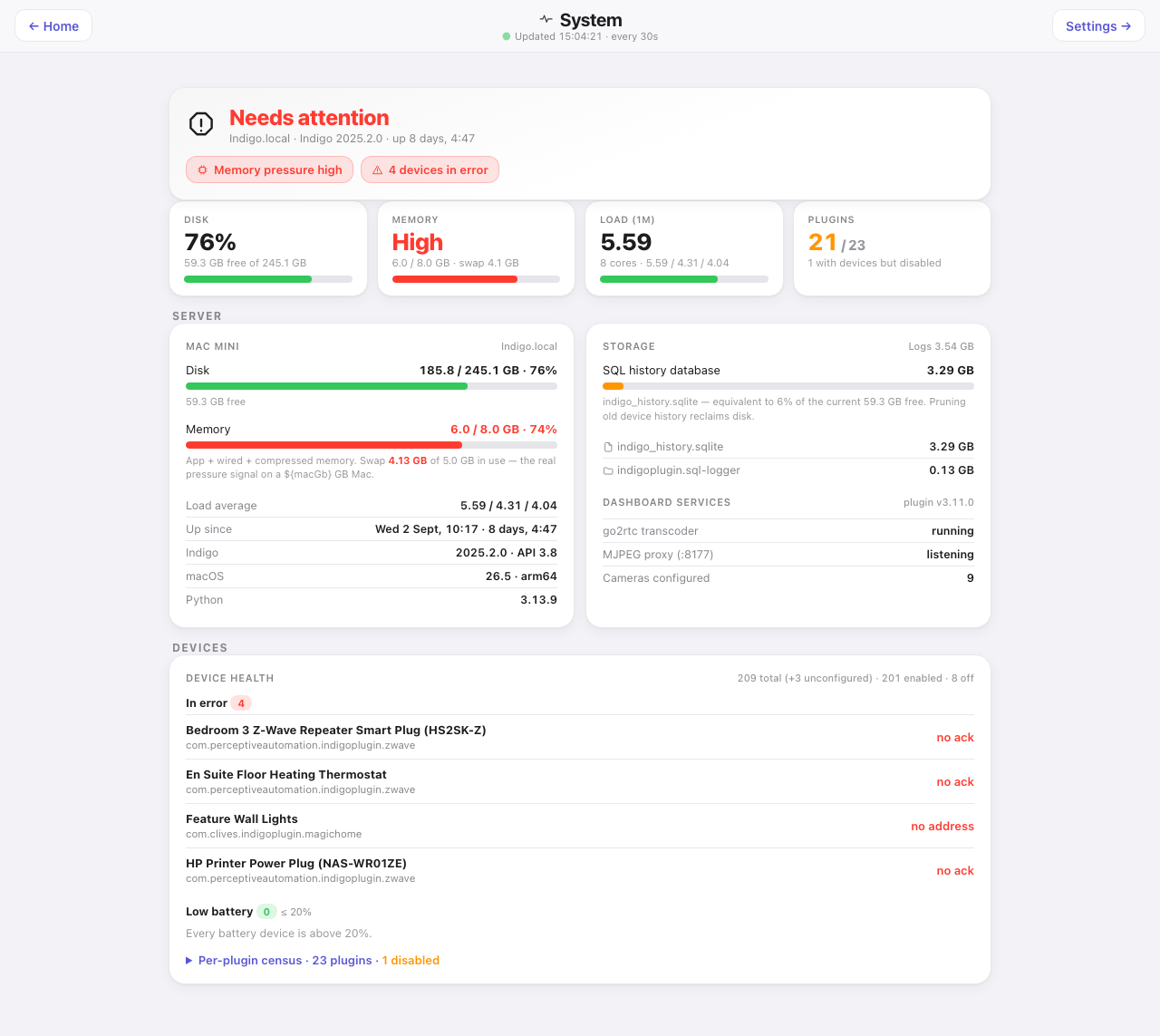
Is the server healthy, is it running out of anything, and is any device unwell. Computed entirely server-side, so it works away from home too.
Down the page
Verdict banner. A headline — “Needs attention” or the healthy equivalent — with the host name, Indigo version and uptime, then a pill per finding. The banner is the summary the rest of the page justifies.
Four tiles. Disk with free space and a bar, memory with a plain word rather than a number plus swap in use, one-minute load against the core count, and plugins running out of the total with a note on how many are disabled but still own devices.
Server. Two cards. The Mac — disk used and free, memory with the composition spelled out (app plus wired plus compressed) and swap called out as the real pressure signal on a small Mac, the three load averages, how long since it started, the Indigo and API versions, the macOS version and architecture, and the Python version. Storage — the SQL history database’s size with a bar showing it against free space, and the advice that pruning old device history reclaims disk, then “Dashboard services”: go2rtc (the camera video service), the plugin’s camera proxy, and the number of cameras configured.
Devices. A device-health census: total, enabled and off counts, then sections — In error (with an explicit “none” rather than an empty space), Low battery (at or below the threshold set under Configure, named, with the owning plugin and the percentage), Quiet battery devices (collapsible, devices that have not reported in longer than the threshold), and a Per-plugin census (collapsible, every plugin with its device count and whether it is disabled). A plugin that is enabled and has crashed shows red as STOPPED. One switched off on purpose shows amber as disabled — because “enabled” alone stays true for a plugin that has crashed.
Automation (from 3.33.0, when the Activity page retired). A count of schedules, triggers and how many are switched off, then the schedules coming up with how long until each fires, and three collapsible lists: triggers watching for problems, everything switched off, and who holds a front-door keypad code (PIN digits are scrubbed server-side and never reach the browser). The “off” count is worth watching: a disabled trigger is invisible everywhere else until something it should have caught goes wrong.
Where the data comes from
systemHealth, one call, computed server-side — a browser cannot read host statistics. It returns the Mac vitals, the history database size, and the device census. The Automation card comes from activityFeed, built from Indigo’s schedule and trigger definitions.
Refresh
Every 30 s. The Automation card every minute.
What you can do here
Expand the two collapsible sections, and follow the link to Settings. Read-only.
Worth knowing
- Swap in use is the number to watch on a small Mac, not the memory percentage. Seventy per cent of 8 GB with 2.5 GB swapped is a different situation from seventy per cent with none.
- Load average above the core count means work is queueing for a CPU, and on a Mac already swapping it usually shares a root with the memory pressure. Every plugin timing out at once is the Mac, not Indigo.
- “With devices but disabled” is a deliberate flag. A disabled plugin whose devices still exist is a silent gap — the devices sit there holding their last known state.
- Quiet battery devices are not the same as offline devices. A Z-Wave sensor that has nothing to report legitimately goes quiet, which is why they are listed separately from errors and behind a fold.