Hub — index.html
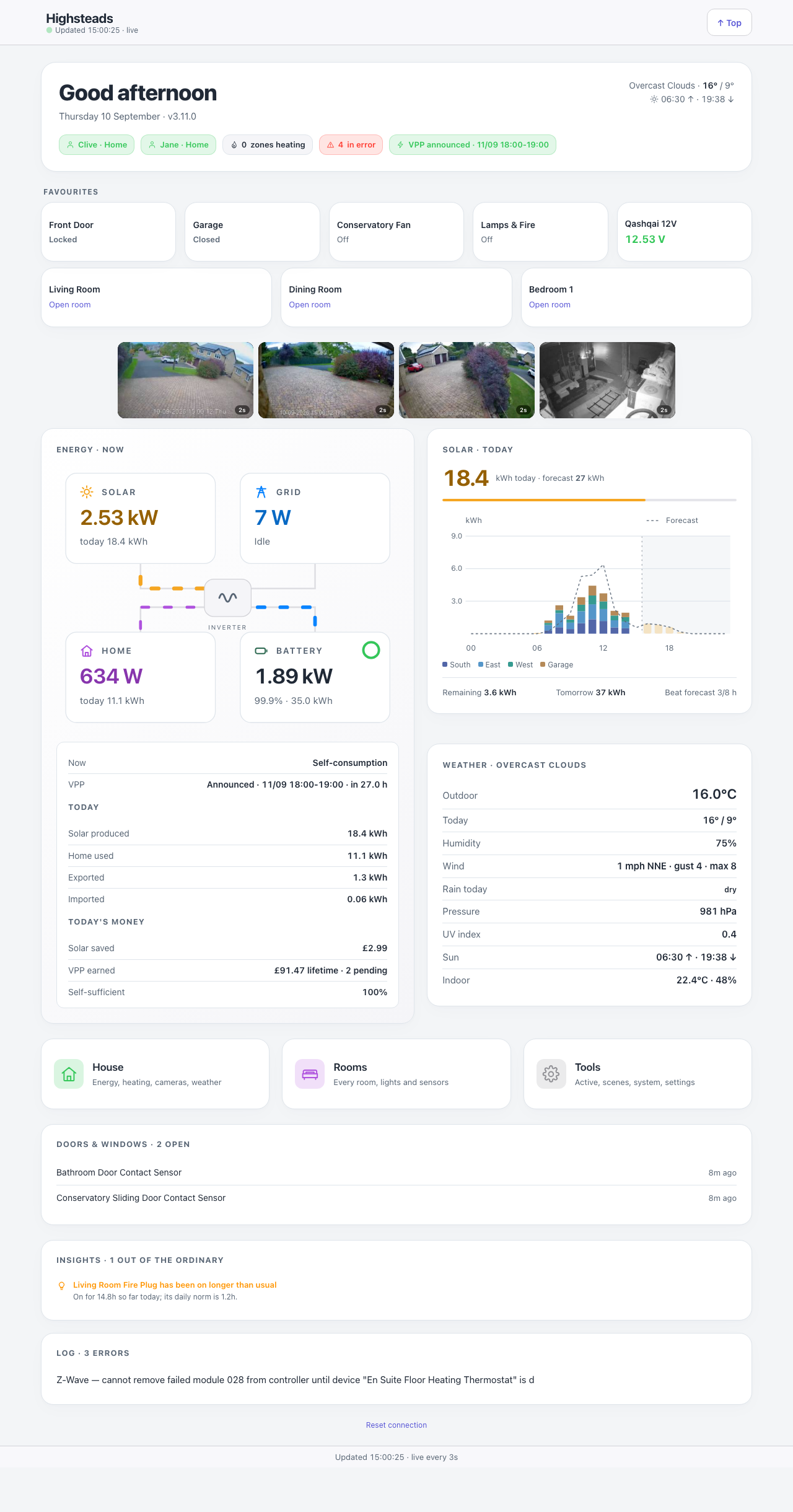
Earlier layout shown above. Camera names, picture ages and the new view controls were added in 3.65.0.
The page every other page hangs off, and the one to keep open on a phone, laptop or tablet. It answers “is the house all right” from the top of the screen, then offers a way into everything else. It is deliberately short: the House, Rooms and Tools tile walls it used to carry moved to the Menu, because they were navigation, not status.
Down the page
Header. The site name, the time of the last successful poll, and the live dot. A “Top” button appears once you scroll.
Greeting card. A time-of-day greeting, the date, the running build number, and the current weather with today’s high and low and the sun times. Below that, a row of pills. The first answers “does anything need me?”: All well in green, or “2 things need a look” in amber or red. Tap it and the list opens in place — devices reporting an error, batteries running low, errors in the Indigo log, cameras that have stopped answering, and anything Home Insights finds out of the ordinary — each line linking to the page with the detail. An all-clear says what it checked. After it come each person’s presence, how many heating zones are calling for heat, a “Fire heater on” pill with the watts while a fire’s heater runs (Broadlink RF 1.4.0 with a power meter), and, when the energy plugin has one coming, a VPP or Saving Session pill.
Favourites. One-tap tiles in the order set on the Settings page. A tile is a control (toggles a device or runs a scene, a device tile flips at once, then checks with the device a few seconds later and puts itself right, with a note, if the command went nowhere), a reading (shows a device state, it is a display, not a button), a door tile (shows the door’s state and acts on it), a room shortcut or a group.
Camera strip. Up to four cameras marked “main”, four across on a wide screen and two by two on a phone. Each has a visible name and a status such as Live, Picture 3s old or Picture unavailable. Tap one to open Cameras with that camera selected and enlarged. The strip starts with stills, then measures whether the connection can carry all its video with room to spare. Slow links keep stills, and failed video falls back and retries. After the strip has been outside the visible part of the page for two seconds, it stops video and further picture requests. Scrolling back resumes them. Hiding the page stops video immediately. The reflector never streams and pauses stills after ten idle minutes. A still’s age comes from its own date, so repeatedly receiving an unchanged picture never makes it look new.
Energy · now. The power-flow diagram — solar, grid, home and battery around a central node, the flowing edges showing which way the power is going and how much. Underneath, today’s totals and today’s money. Only shown when SigenEnergyManager is installed and enabled. Without it this card, the Solar card and the power-cut banner are left out altogether, the Weather card takes the full width, and the Menu tile no longer mentions Energy.
Solar · today. Today’s kWh against the forecast with a progress bar, then a stacked hourly chart of per-array actuals with a dashed forecast tick on each, and a line giving remaining, tomorrow, and how many daylight hours beat their forecast. Like Energy · now, it needs SigenEnergyManager and is left out without it, and the page then never asks the server for the hourly chart either.
Weather station. What the local station reads: outdoor temperature, humidity, wind with gust and maximum, rain today, pressure, UV index and the indoor reading. Conditions, today’s range and the sun times are in the greeting card, so this card does not repeat them, and without a station of its own it steps aside.
Car charger (from 3.56.0, only when Indigo has a myenergi Zappi from the Zappi plugin). One strip under the three cards above: the charger’s own status line, the power going into the car, the charge added and what the export guard is doing. It opens the Car charger card on the Energy page. When the charger cannot be reached, or has not reported for ten minutes, it says which and shows no figures.
Menu / Rooms. Two cards: one opens the Menu, the other its list of rooms.
Doors & windows. Everything currently open, most recent first, with how long it has been that way.
Footer. Last update, the poll cadence, and a Reset connection link that clears the stored API key from this browser.
Where the numbers come from
| Part | Source |
|---|---|
| Devices, rooms, favourites, doors, car charger | Indigo REST /v2/api, through the shared delta cache |
| Room list and membership | rooms.json, written by the plugin |
| Weather | weather.json, written by the plugin from OpenWeatherMap |
| Energy, solar, money, VPP | sigenApi — the plugin’s proxy to SigenEnergyManager (not asked without it) |
| Hourly solar chart | solarStringHours, from the SQL Logger’s inverter history (not asked without SigenEnergyManager) |
| Needs a look | devices from the poll, logErrors, homeInsights, and the camera health in streams.json |
| Camera stills | The snapshots the plugin writes to a private folder under /public/dashboards, found through the cameraStills action |
Refresh
- Device summary every 3 s, and only for devices the
changedSinceendpoint says have moved. - Energy every 30 s.
- Insights and the log watch every 5 minutes. Camera health every minute.
- Weather every 10 minutes.
- The greeting re-renders every minute so the date rolls over on a page left open overnight.
Before any of that, the gate checks the plugin’s liveness stamp. If the plugin is stopping, the page stops calling it.
What you can do here
- Tap a favourite to toggle a device, run a scene, or work a door in the direction its own state calls for.
- Tap a room, a camera or any card to open its page, or the Menu or Rooms card to open the menu or its list of rooms.
Control tiles honour the PIN if the device is on the PIN list, and a guest-paired browser cannot control anything at all.
Worth knowing
- The camera strip is the page’s whole bandwidth story. It decides live-versus-still by timing the connection, keeps the answer for three minutes, and times it again after that when you come back to the page. Until it knows, it shows stills.
- The build number under the greeting is the fastest way to tell whether a wall tablet is running old JavaScript after an upgrade.
On screens up to 600 pixels wide, Favourites uses three columns for controls, readings and room shortcuts. Names wrap, and the camera layout is unchanged.