Room — room.html?room=Name
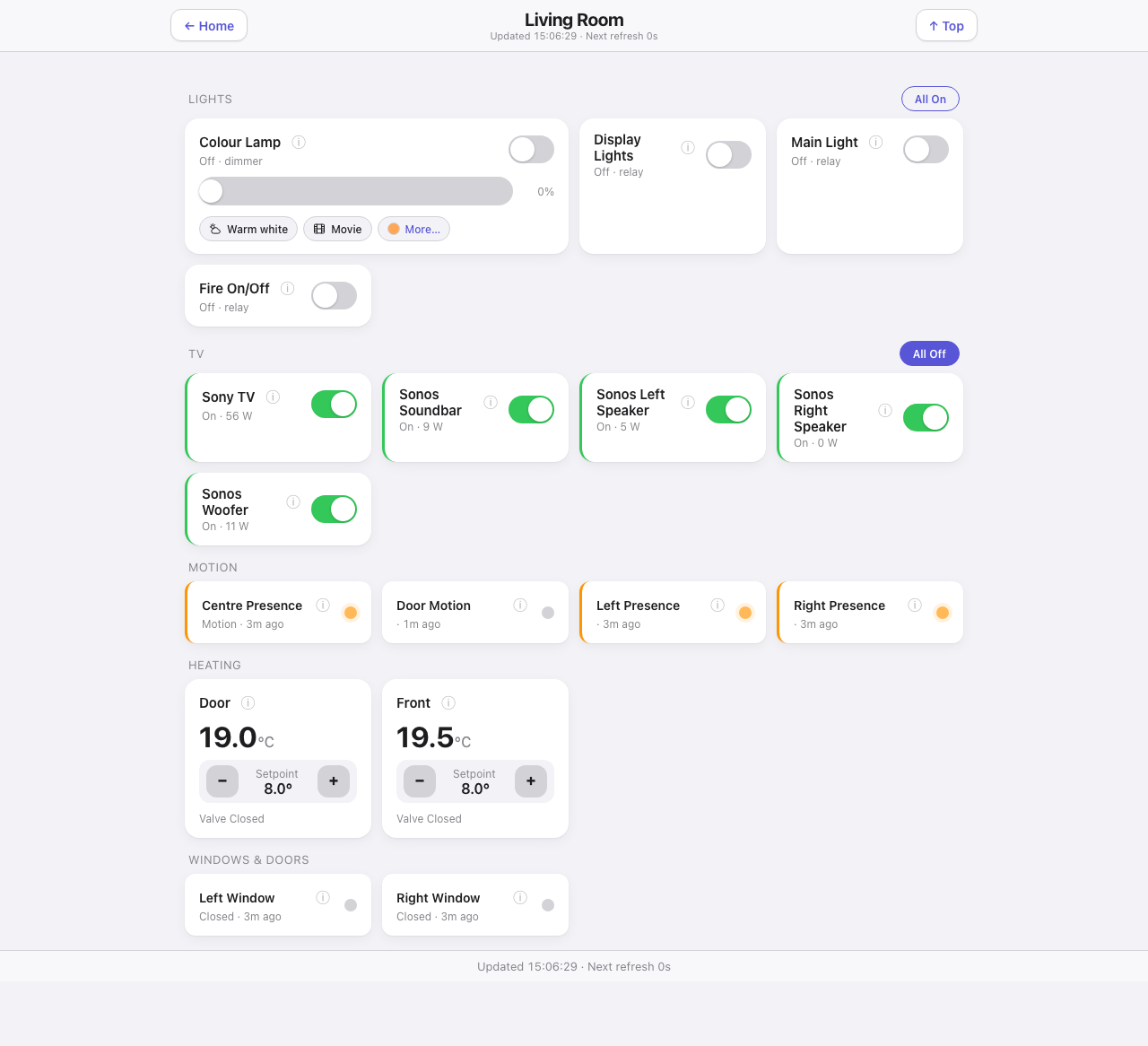
One template serving every room. Which room it shows comes from the query string:
room.html?room=Living%20Room
Reached by tapping a room tile on the hub or on the menu. Sections appear only when the room has something in them, and each is headed by a category label with a bulk action on the right — “All On” for lights, “All Off” for the TV group.
Down the page
Lights. One card per light: the name, an info button, the state and the device class (“Off · relay”), and its control — a toggle, and a brightness slider for a dimmer. A colour-capable light gets scene chips underneath (Warm white and Movie by default) and a “More…” chip that opens a full colour picker.
Fire. A relay the room extras mark as a fire, the same shape as a light card but kept apart, because it is switched by RF and never tells the page it has actually lit.
Fire with a power meter. With Broadlink RF 1.4.0 or later and a meter set on the fire’s relay, the fire’s card reads the meter wherever it sits, Lights included: “Heater on” in amber with the watts, “Flame only”, “Off”, “Turning on…” while a command is on its way, “Did not respond” when the fire ignored one, and “not confirmed” when the meter cannot be read.
TV. The AV group from the room extras. Each card shows current draw in watts alongside its toggle, and an active card carries a coloured edge, so what is actually on reads at a glance.
Plugs & sockets. Plugs from the room extras, a toggle each, with no bulk button — a freezer or a router could be on one.
Motion. Presence and motion sensors, each with its state and how long ago it changed, and a dot rather than a switch — these are readings, not controls. A sensor that is detecting pulses gently.
Appliances. A power meter paired with an ApplianceMonitor cycle device: live watts, Idle / Running / Door open, and last-cycle stats.
Heating. The room’s radiator zones with the current temperature large, a setpoint stepper, and the valve state. The same control as the Heating page, scoped to this room.
Windows & doors. Contact sensors with their state and how long they have been that way.
Doors. A pulse-door tile for a garage opener or a gate: press it and the button takes over, counts the seconds, and holds until the contact sensor confirms the door moved. Red standing open, blue in travel, amber stuck, quiet when closed — and an unreadable door stays quiet with a dash rather than a confident “Closed”.
Cameras. Any camera whose entry names this room, as a still that cross-fades every three seconds, fetched only when the picture has changed. Tap it and the Cameras page opens with that camera enlarged at the top and live when the connection allows it.
Footer. Last update and refresh cadence.
Where the data comes from
| Part | Source |
|---|---|
| Room membership and section titles | rooms.json, with per-room overrides from the Settings page |
| Device state | Indigo /v2/api through the shared delta cache |
| Which control each device gets | capabilities.js |
| Scene chips and colour presets | config.js, written by the plugin |
Classification into lights, motion, radiators and windows is automatic, from Indigo device folders and names. Where it gets a device wrong, the Settings page has a per-room override.
Refresh
Every 3 s.
What you can do here
- Toggle and dim any light, and run a light scene from its chip.
- Turn the whole lights group on or off (the
mainLightin the room extras is left out of that), or the whole TV group off. - Step a radiator setpoint.
- Pulse a door.
- Open the info panel on any device.
Motion sensors and contact sensors are read-only. Every control watches the device’s state until the thing has actually happened, rather than assuming the command landed.
Worth knowing
- A room with no override still gets sensible sections, but the Settings page shows how many doors and appliances each room resolved to — a room reading “0 doors” that has doors is the classifier needing an override.
- The coloured card edge is the fastest read on the page. It marks active rather than switchable, so a green edge on the TV group means something is drawing power.
- A missing device state is treated as unknown, never as a match: a sensor that has never reported cannot confirm a state it never saw.