Mains — mains.html
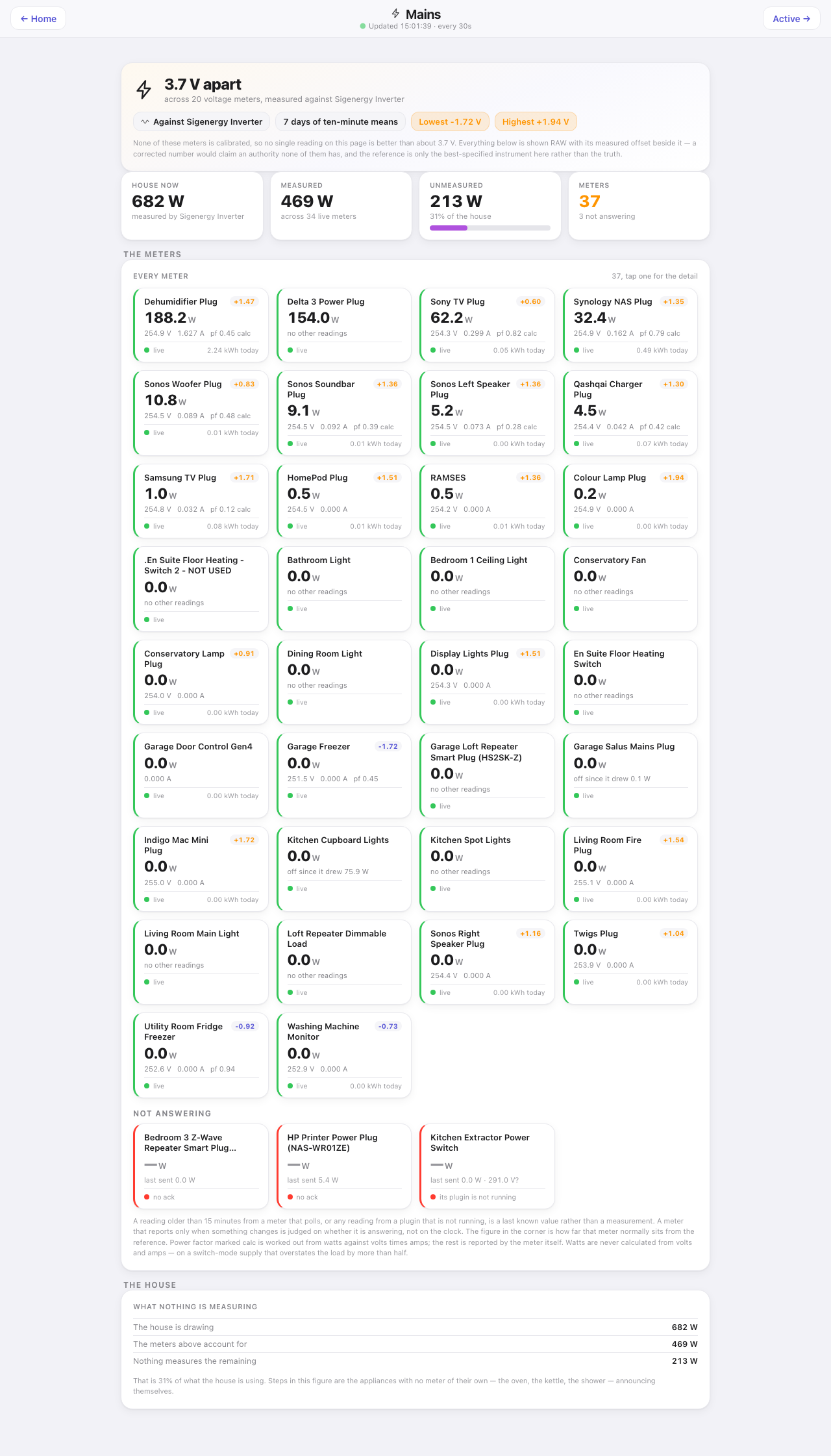
Every mains meter in the house — every device that reports watts — and how far each one disagrees with the others. None of them are calibrated. Rather than pretend one of them is right, the page leads with how far they disagree, and shows every reading raw with its own measured offset beside it. On the house it was built on they span 3.7 V.
The reference the meters are measured against, and the whole-house figure, come from the Sigenergy inverter. Without SigenEnergyManager the page is simply the meters: the trust panel, House now, Unmeasured and The house are left out, the strip keeps Measured and Meters, and the meter cards carry no offset.
Down the page
Trust panel. The headline is the spread, not a reading: how many volts apart, across how many voltage meters, measured against the inverter. Pills give the comparison basis — seven days of ten-minute means — and the lowest and highest offsets. The note underneath says why nothing here is corrected: a corrected number would claim an authority none of these meters has.
House now. What the house is drawing according to the reference, what the meters below account for between them, what nothing measures, and how many meters exist against how many are not answering.
The meters. Every meter as its own card, green-bordered while live and red-bordered while not answering, each showing its watts, voltage, current and power factor (marked “calc” when worked out from watts against volts times amps rather than reported), and its measured offset in the corner. A meter reading exactly 0.0 W still shows volts and amps — it is switched off, not absent. The “not answering” group at the bottom gives the last value sent and why it stopped: no acknowledgement, or its owning plugin is not running.
The house. The total draw, what the meters account for, and the remainder in watts and as a percentage, with a one-line explanation that the gap is appliances with no meter of their own.
Where the numbers come from
mainsMeters: every device that reports powerWatts, curEnergyLevel, plain power, or a sensor value alongside a mains-range voltage, read directly from Indigo rather than from history — so a card here is exactly what the live device state says right now. The trust panel’s offsets come from the SQL Logger history: paired ten-minute means for each meter against the reference over the last seven days.
Refresh
Every 30 s.
What you can do here
Tap any meter tile to open its own page. Nothing here is a control.
Worth knowing
- Never trust a raw voltage from one plug in isolation — that is exactly the mistake this page exists to prevent. A single plug reading high nearly reached a wrong over-voltage report to a network operator before this page existed to show the whole spread.
- A meter that reports only on change (most Z-Wave and Zigbee devices) is not stale just because it has been quiet. The page tells “not answering” from “nothing has changed to report”, judging the first by the owning plugin’s own reachability flag, and only that turns a card red.
- A dead meter is greyed out as a whole row, values and all. An Indigo device state is a last known value, so a dead meter’s voltage and power are last week’s readings, and showing one beside a dash would make the survivor look authoritative.
- A meter that reports on change may never send its zero: a dimmer that reports its draw when the load comes on and never a final nought sits frozen at the last real figure. The page believes the switch over the frozen number for meters that do not poll, and says “off since it drew 75.9 W” rather than losing the figure.