Settings — settings.html
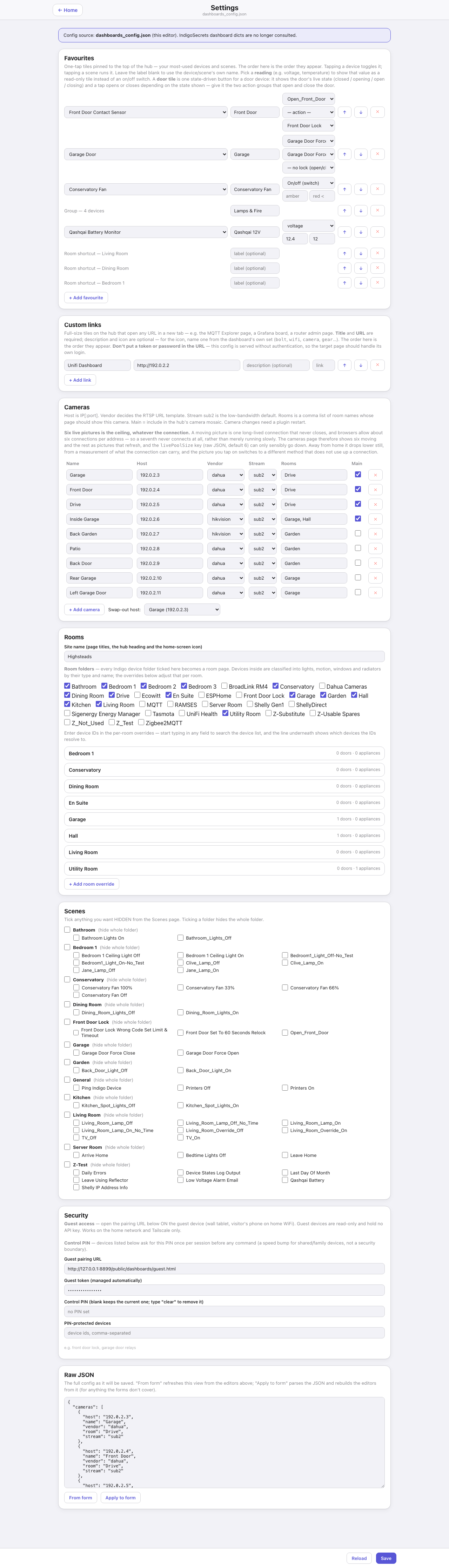
Everything the plugin’s pages read from configuration, editable in the browser. The banner at the top states where it writes: dashboards_config.json in the plugin’s Preferences folder, which from the first Save is the single source of truth. The full description of every key is on the Configuration page. This is the page itself.
Down the page
Favourites. The hub’s one-tap tiles, reorderable. Each row is a control, a reading, a door tile, a room shortcut or a group, with a device or scene picker showing which device an id resolves to. A favourite whose device no longer exists is named — “(not found: device #123456 — pick another, or it stays as is)” — and kept until you actively choose something else. A favourite type a newer hub understands and this editor does not rides through a save untouched rather than being dropped.
Custom links. Extra tiles for the menu’s Tools group.
Cameras. One row per camera: host, name, make, stream, rooms, and whether it is in the hub’s strip. The box under the make shows the address the plugin will use, in grey; type into it only when the camera needs a different one, which other always does. A swap-out host picker sits at the bottom. Camera changes need a plugin restart, and the card says so.
Rooms. Which Indigo device folders become rooms, and per-room overrides. Device sections — lights, motion, windows, radiators — are classified automatically from folders and names, this is where you correct that. Each room shows what it currently resolves to (“1 doors · 0 appliances”), and typing in a field searches the device list.
Scenes. Every action group with a tick to hide it from the Scenes page, and a per-folder tick that hides the whole folder.
Security. The guest pairing URL (open it on the guest device), the guest token shown for reference, and the control PIN — asked once per session before any command on the listed devices (and before the Heating page’s boost and force buttons when any heating zone is listed). A speed bump for shared and family devices rather than a security boundary. The PIN field hides what you type and is not offered to the browser’s form memory. Leave it blank to keep the current PIN, or tick Remove the PIN to take it away. Below it, the list of PIN-protected device ids.
Raw JSON. The whole configuration as it will be saved, with From form to regenerate it from the editors above and Apply to form to parse it back. The escape hatch for anything the forms do not cover.
Save bar. Fixed to the bottom: Reload and Save.
Where the data comes from
getDashboardsConfig returns the effective configuration plus a device index for the pickers, saveDashboardsConfig validates, writes the file and applies it live. The pickers also read /v2/api for device names.
Refresh
None. It loads once, and you save deliberately.
What you can do here
Everything on the page is editable, and Save writes it. Camera changes need a plugin restart, the rest apply live. Save checks the plugin is actually up first — this is the page most likely to be opened right after a restart.
Worth knowing
- The page shows what is saved, not what is running. Reopen it after adding a camera and the new camera is in the list, whether or not the plugin has restarted yet.
- Room overrides are the fix for a device the classifier put in the wrong section. Read the resolved counts under each room before assuming a page is broken.
- The screenshot above has its token blanked: anything labelled token, key, PIN or password is masked on the way to the capture.